








 Multi-language
 1 PC
1 PC Windows
 1-Year License


Autodesk Raster Design – Convert and Edit Raster Images in AutoCAD with Ease
Transform Raster Data into Intelligent CAD Drawings
Autodesk Raster Design is a specialized AutoCAD toolset designed to help architects, engineers, and designers work efficiently with raster images and scanned drawings. It provides the ability to convert raster data into vector objects, edit raster graphics, and integrate scanned drawings directly into CAD workflows.
Whether you are modernizing old paper drawings, cleaning up scanned maps, or integrating satellite imagery into a CAD project, Autodesk Raster Design delivers a complete set of tools to enhance productivity. By combining raster editing with vector design, it bridges the gap between legacy data and modern digital CAD systems.
At GraphicLicense, we provide genuine Autodesk Raster Design licenses, instant digital delivery, and support to help professionals streamline their design workflows.
What Is Autodesk Raster Design?
Autodesk Raster Design is an add-on toolset for AutoCAD and AutoCAD-based software that allows users to:
-
Edit, enhance, and clean raster images
-
Convert raster graphics into vector objects
-
Embed scanned blueprints, aerial photos, or satellite imagery
-
Use hybrid raster-vector editing tools for accuracy
This solution is commonly used in industries where older paper drawings or scanned data need to be integrated into modern CAD projects, including:
-
Architecture and construction
-
Civil engineering and urban planning
-
Infrastructure and utility management
-
Manufacturing and mechanical engineering
-
Mapping and geospatial projects
By combining vector drafting with raster processing, Autodesk Raster Design ensures that historical or scanned data remains usable and accurate in current design workflows.
Key Features of Autodesk Raster Design
1. Raster-to-Vector Conversion
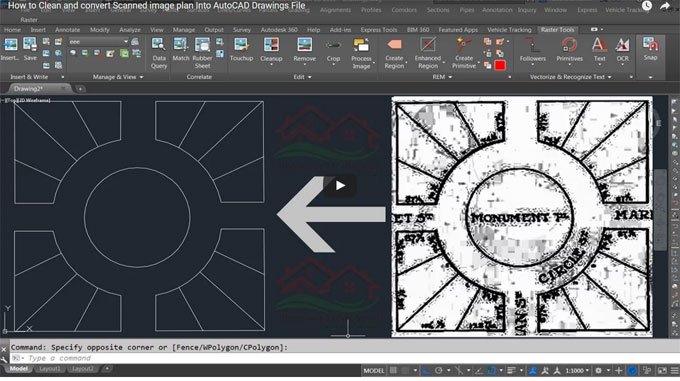
Automatically convert raster lines, arcs, and text into vector CAD objects. This feature significantly reduces manual tracing, helping users quickly transform old drawings into editable AutoCAD designs.
2. Raster Editing and Cleanup
Use specialized tools to remove noise, despeckle, straighten, and edit raster images. Clean up scanned drawings to improve readability and accuracy before converting to vector formats.
3. Vectorization Tools
-
Line following and polyline creation from raster
-
Circle and arc recognition for mechanical or architectural drawings
-
Text recognition tools to aid in annotation recovery
4. Hybrid Editing
Simultaneously edit both raster and vector data in a single drawing. Add or modify CAD geometry while interacting with raster images directly in AutoCAD.
5. Image Insertion and Georeferencing
-
Insert aerial imagery, scanned maps, or satellite photos
-
Align raster images with coordinate systems for civil and geospatial projects
-
Combine GIS data with engineering drawings
6. Raster Entity Manipulation
Turn raster pixels into intelligent entities that can be stretched, rotated, scaled, mirrored, or erased—just like vector objects.
7. Seamless AutoCAD Integration
Because it is built as an AutoCAD add-on, Autodesk Raster Design works with familiar commands, menus, and workflows. It supports most major raster formats, including:
-
TIFF
-
JPEG/JPEG 2000
-
BMP
-
PNG
-
ECW
-
SID (MrSID)
8. Batch Processing and Automation
Automate repetitive raster operations or batch-process multiple images, increasing productivity for projects with large archives of scanned documents.
Benefits of Using Autodesk Raster Design
-
Preserve Legacy Drawings
Transform old blueprints, scanned schematics, and historical maps into usable digital CAD files. -
Save Time on Manual Tracing
Raster-to-vector conversion tools significantly reduce labor-intensive digitization processes. -
Enhance Drawing Accuracy
Cleanup and vectorization improve the clarity and precision of older data, making it reliable for modern projects. -
Support Hybrid Projects
Work on both raster and vector data simultaneously, creating a seamless experience for projects that involve multiple data types. -
Boost Productivity
With batch processing, smart recognition tools, and AutoCAD integration, users can process large volumes of scanned data quickly and efficiently.
Common Use Cases for Autodesk Raster Design
Autodesk Raster Design is widely used in scenarios where digitization of existing drawings or image-based workflows is necessary:
-
Architecture: Digitize and clean old building blueprints for renovation projects
-
Civil Engineering: Convert scanned survey maps into editable CAD drawings
-
Utilities and Infrastructure: Integrate aerial photos with utility layouts
-
Mechanical Engineering: Modernize legacy mechanical drawings for redesigns
-
Government and GIS: Convert raster maps for urban planning and land management
-
Manufacturing: Preserve and reuse old production line drawings and documentation
In every industry, Raster Design provides a cost-effective solution to extend the life of historical data.
System Requirements
Autodesk Raster Design runs as a toolset within AutoCAD or AutoCAD-based applications. The following are typical requirements:
Operating Systems:
-
Windows 10 (64-bit)
-
Windows 11 (64-bit)
Hardware:
-
Processor: 2.5 GHz (3+ GHz recommended)
-
Memory: 8 GB (16 GB recommended for large images)
-
Disk Space: 6 GB for installation
-
Graphics: DirectX 11-capable GPU for optimal performance
Supported AutoCAD Versions:
-
Compatible with recent AutoCAD releases (check the product year and compatibility list)
Note: Raster Design is Windows-only and requires a compatible AutoCAD installation.
Licensing Options
At GraphicLicense, we offer flexible licensing solutions for Autodesk Raster Design:
-
Single-User License – Ideal for individual professionals
-
Multi-User / Network License – Perfect for teams or enterprise environments
-
Perpetual or Subscription Options – Choose based on your project duration and budget
-
Educational Licenses – Discounted access for students, educators, and academic institutions
Each license comes with:
-
Official Autodesk activation key
-
Instant digital delivery and installation instructions
-
Email and remote support for activation and setup
-
Legal and audit-compliant licensing for commercial use
How to Download and Install Autodesk Raster Design
-
Purchase your Autodesk Raster Design license from GraphicLicense
-
Receive the official download link and activation key by email
-
Install the software as an AutoCAD toolset on your system
-
Activate the product with your license key
-
Start converting and editing raster images in your CAD projects
Our team provides step-by-step guidance and support for installation or network deployment.
Autodesk Raster Design vs. Manual Digitization
| Feature | Manual Tracing | Autodesk Raster Design |
|---|---|---|
| Time Required | High | Significantly Reduced |
| Accuracy | Dependent on user skill | Enhanced via smart conversion |
| Automation | None | Batch processing supported |
| Editing Both Raster & Vector | ✘ No | ✔ Yes |
| Integration with AutoCAD | Limited | Full |
Using Autodesk Raster Design can reduce hours of manual work into minutes while improving precision and maintaining data integrity.
Why Buy Autodesk Raster Design from GraphicLicense?
-
Official Autodesk licenses – Fully verified for professional use
-
Instant digital delivery – Start working the same day
-
Competitive pricing – Flexible for individual and enterprise users
-
Expert support – Guidance on installation and activation
-
Volume and network licenses available – Scalable for teams and organizations
-
Compliance assurance – Legal and audit-ready licensing
We help professionals and businesses seamlessly integrate Raster Design into their workflows with confidence and support.
Conclusion
Autodesk Raster Design is the ultimate tool for converting, editing, and managing raster data within AutoCAD environments. It transforms scanned drawings, satellite imagery, and historical maps into vector-rich, editable CAD files. By leveraging Raster Design, professionals save time, reduce errors, and ensure that legacy data can continue to add value to modern projects.
If you want to streamline your CAD workflow and unlock the power of hybrid raster-vector editing, purchase Autodesk Raster Design today from GraphicLicense and start enhancing your productivity.
Get More Cheap AutoDesk Licences

There are no reviews yet.