







 Multi-language
 2 Devices
 Windows


MS Office Project Professional 2016 – Classic Project Planning Software That Delivers Results
Trusted Desktop-Based Project Management for Professionals
MS Office Project Professional 2016 is a reliable, full-featured project management software developed by Microsoft for professionals who need to plan, execute, and track projects from start to finish. Built with flexibility and precision in mind, this version empowers project managers, business leaders, and organizations to create detailed project plans, allocate resources, manage budgets, and oversee timelines with complete control.
Whether you are overseeing IT implementations, engineering rollouts, construction schedules, or operational tasks, Microsoft Project Professional 2016 provides a familiar interface and deep functionality tailored for serious project management. As a perpetual license product, it allows you to purchase once and use it indefinitely—no recurring fees, no internet dependency after activation.
At GraphicLicense, we provide the official Microsoft Project Professional 2016 download, including a genuine license key, secure delivery, and expert support.
ms office project professional 2016
What Is Microsoft Project Professional 2016?
Project Professional 2016 is part of the Microsoft Office 2016 suite, offering a structured platform for professional project planning and execution. Designed to help individuals and teams meet deadlines and stay organized, it supports the full lifecycle of project management—from setting initial objectives and resources to tracking progress and reporting final results.
It integrates with core Office applications like Excel, Outlook, Word, and SharePoint, making it easy to coordinate documents, data, and communications in a familiar environment. With advanced Gantt chart views, resource leveling, cost tracking, and timeline visualization, Project 2016 remains a popular choice among seasoned project managers and PMOs.
Core Features of MS Office Project Professional 2016
1. Intuitive Gantt Chart Scheduling
Plan projects using dynamic Gantt charts that let you create, link, and adjust tasks with ease. Project automatically calculates critical paths, dependencies, slack time, and durations to keep your schedules on track.
2. Detailed Resource Management
Assign resources, define working hours, track availability, and level workloads across multiple projects. Project 2016 helps you avoid over-allocation and understand resource costs more accurately.
3. Multiple Timeline Views
Use timeline visualizations to show different phases, workstreams, or project layers simultaneously. This feature is especially useful for presentations and executive overviews.
4. Collaboration Tools
Connect with SharePoint or Project Server to sync project data, share files, and collaborate with team members. You can also integrate with Microsoft Exchange to manage task updates via email or Outlook.
5. Built-in Reports
Project Professional 2016 includes pre-made reports for Burndown Charts, Task Progress, Resource Overview, and Cost Summaries. Custom report creation is also available using Excel and Power BI.
6. Task Path Highlighting
Visually trace how tasks relate within the schedule. Highlight predecessor and successor relationships directly in the Gantt view.
7. Team Planner View
Gain an overview of tasks assigned to team members. Drag and drop assignments across timelines to manage workloads efficiently.
8. Timesheet Submissions
Log project and non-project work time, allowing businesses to track labor costs and monitor performance against plans.
Key Benefits of Microsoft Project 2016 Professional
-
Familiar Office Interface: Users familiar with Word or Excel will adapt easily to Project’s ribbon UI
-
Offline Capabilities: Once activated, Project 2016 runs without internet access
-
One-Time Payment: No subscriptions or monthly fees
-
Scalable: Manage everything from simple task lists to multi-year, multi-resource programs
-
Compatibility: Integrates with older systems for organizations not ready to upgrade
-
Custom Fields and Tables: Tailor the experience to your organization’s reporting needs
-
Flexible Deployment: Ideal for desktops, workstations, and local network environments
ms office project professional 2016
What’s New in Project 2016 (Compared to Project 2013)
While it retains the same overall framework, Microsoft Project 2016 introduces several key improvements:
-
Multiple Timelines: Create side-by-side timelines with different start/end points
-
Tell Me Search Box: Quickly find tools and commands with natural language
-
Resource Engagements: Gain better visibility over resource commitments and approvals
-
Improved Integration: Connect more effectively with Office 365, SharePoint, and Exchange
-
Updated Reporting: More powerful, visually appealing reports without external tools
-
Enhanced Collaboration: Connect team members with SharePoint task lists and cloud services
These additions make Project 2016 more flexible and responsive to the needs of larger teams and cross-functional project environments.
System Requirements
To run Microsoft Project Professional 2016 successfully, ensure the following minimum system specifications:
Operating System:
-
Windows 7 SP1, Windows 8.1, Windows 10, or Windows 11
-
Windows Server 2008 R2 or later
Hardware:
-
Processor: 1 GHz or faster
-
Memory: 2 GB RAM (32-bit), 4 GB RAM (64-bit)
-
Storage: 3 GB of available disk space
-
Display: 1024 x 768 screen resolution
-
Graphics: DirectX 10-compatible GPU for hardware acceleration
Note: Project Professional 2016 is not available for macOS. Mac users may use a Windows virtual machine or consider Project for the Web.
Who Should Use MS Project Professional 2016?
Project 2016 is best suited for:
-
Experienced project managers needing comprehensive scheduling tools
-
Construction and engineering teams managing subcontractors and budgets
-
Consultants and freelancers handling multiple client projects
-
IT departments deploying phased system upgrades or software releases
-
Academic institutions coordinating research projects or curriculum development
-
Finance and operations teams forecasting resource usage and expenditure
-
Government agencies executing multi-year initiatives with strict compliance rules
If your workflow depends on structured planning, resource tracking, and detailed reporting, Project Professional 2016 offers a battle-tested platform.
Licensing and Delivery
At GraphicLicense, you receive:
-
✅ A genuine Microsoft license key for Project Professional 2016
-
✅ A secure download link from Microsoft servers
-
✅ Lifetime activation for one Windows PC
-
✅ No subscriptions, renewals, or hidden charges
-
✅ Instant email delivery after purchase
-
✅ Installation assistance and license verification support
Perpetual Licensing Model:
-
Own it for life – use it as long as your system supports it
-
No internet required after activation
-
Ideal for businesses that need fixed-cost software
-
Suitable for regulatory environments that restrict cloud applications
-
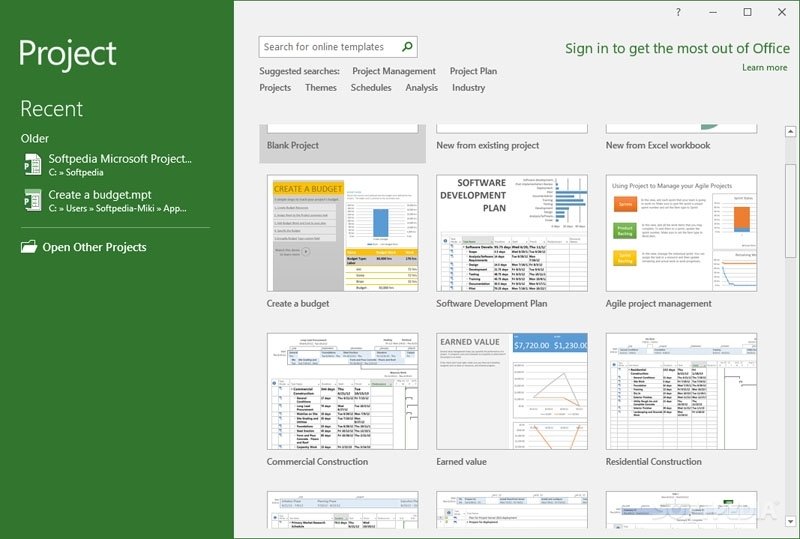
MS Office Project Professional 2016
How to Download and Install
-
Purchase your license securely through GraphicLicense
-
Receive your product key and download instructions via email
-
Download and install Microsoft Project Professional 2016
-
Enter the license key during activation
-
Start managing your projects immediately with full features
We also offer multi-license options for teams and volume deployments.
ms office project professional 2016
Microsoft Project 2016 vs. Later Versions
| Feature | Project 2013 | Project 2016 | Project 2019 | Project 2021 |
|---|---|---|---|---|
| Multiple Timelines | ✘ No | ✔ Yes | ✔ Yes | ✔ Yes |
| Resource Engagement | ✘ No | ✔ Yes | ✔ Improved | ✔ Improved |
| Office Integration | Office 2013 | Office 2016 | Office 2019 | Office 2021 |
| Licensing | Perpetual | Perpetual | Perpetual | Perpetual |
| Subscription Required | ✘ No | ✘ No | ✘ No | ✘ No |
| Teams/Cloud Collaboration | Limited | ✔ SharePoint Support | ✔ Microsoft Teams | ✔ Enhanced Teams |
Project 2016 remains a great option for users looking for advanced features without the higher costs of newer versions.
Why Buy from GraphicLicense?
-
Trusted reseller of Microsoft software with verified activation keys
-
Instant digital delivery for fast access
-
Volume discounts for businesses, schools, and nonprofits
-
Support team to help with installation, activation, and updates
-
Compliance-ready software for audits and professional use
-
Transparent pricing and clear licensing terms
We help professionals and teams get the software they need—quickly, securely, and affordably.
ms office project professional 2016
Conclusion
MS Office Project Professional 2016 offers a feature-rich, stable platform for managing your projects with full control and clarity. It combines the power of Microsoft’s scheduling and resource planning tools with a one-time cost and offline functionality. For professionals who value a proven, perpetual-license solution, Project 2016 delivers lasting value and performance.
Whether you’re managing short-term deliverables or overseeing a complex, multi-phase initiative, Microsoft Project Professional 2016 provides the structure and depth you need to deliver on time, on budget, and with confidence.
Order your Project Professional 2016 download today from GraphicLicense and take your project planning to the next level.
Get More Cheap Software Licences
ms office project professional 2016 ms office project professional 2016
There are no reviews yet.