







 Multi-language
 2 Devices
 Windows Lifetime


Visual Studio Enterprise 2022 – Complete Development Suite for Enterprise-Grade Applications
Build, Test, and Scale Enterprise Applications with Confidence
Visual Studio Enterprise 2022 is Microsoft’s most advanced integrated development environment (IDE), engineered for large-scale software development, enterprise application management, and cross-functional DevOps workflows. It combines deep debugging capabilities, high-end diagnostics, cloud integration, and advanced testing tools to meet the needs of full-stack engineers, architects, and enterprise teams managing complex application ecosystems.
With full support for modern frameworks like .NET 7, ASP.NET Core, .NET MAUI, Blazor, C++, Python, and more, Visual Studio Enterprise 2022 provides the productivity, scalability, and security features required in high-performance development environments. Whether you’re building web APIs, desktop apps, mobile platforms, microservices, or deploying to Azure, Visual Studio Enterprise is built to scale alongside your projects.
At GraphicLicense, we provide verified licenses for Visual Studio Enterprise 2022, with immediate delivery, secure activation, and expert assistance tailored for developers, teams, and enterprise organizations.
What Is Visual Studio Enterprise 2022?
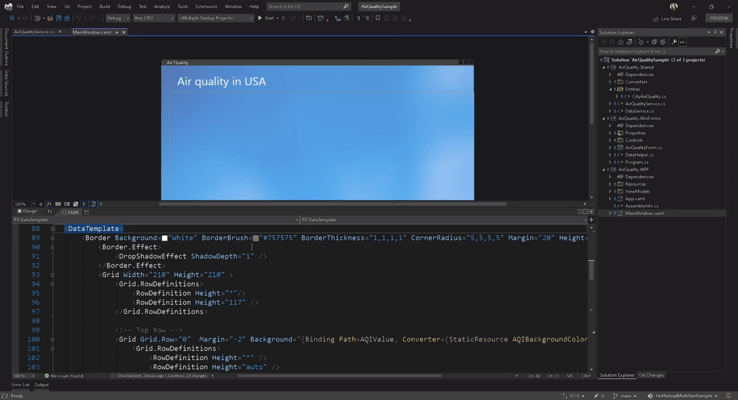
Visual Studio Enterprise 2022 is the premium edition of Microsoft’s IDE platform, offering comprehensive tools for application lifecycle management, including design, code, test, debug, deployment, and monitoring. It is optimized for large teams working on multi-layered codebases, integrating CI/CD pipelines, cloud infrastructure, and robust testing frameworks.
Enterprise 2022 stands out from other editions due to its exclusive features such as IntelliTrace, Live Unit Testing, CodeLens with team insights, advanced architectural validation tools, and integrated load testing support.
As the first 64-bit version of Visual Studio, the 2022 release eliminates memory limitations and dramatically improves performance, making it capable of handling the largest and most complex solutions developers encounter.
Key Features of Visual Studio Enterprise 2022
1. 64-Bit IDE Performance
Visual Studio Enterprise 2022 runs natively in 64-bit, allowing developers to work with massive projects without performance bottlenecks. It reduces out-of-memory errors and enables faster solution loading, compiling, and debugging.
2. IntelliTrace Debugging
One of the exclusive features in the Enterprise edition, IntelliTrace allows you to record and replay execution steps, enabling deeper root-cause analysis of complex bugs across multiple threads or historical sessions.
3. Live Unit Testing
Automatically run impacted tests in real time as you write and modify code. This helps maintain test coverage and catch regressions before code is merged into production.
4. CodeLens for Team Insights
CodeLens provides contextual information about code elements, such as references, changes, test status, and authorship—directly in the editor. Developers can see who last modified a method or whether a unit test has passed without navigating away.
5. Architectural Layer Diagrams
Ensure architectural integrity by modeling and validating the system’s layer diagrams. These diagrams help enforce code constraints and highlight unwanted dependencies.
6. Advanced Testing Tools
Enterprise 2022 includes test impact analysis, Microsoft Fakes framework, load testing capabilities, and test plan management—all integrated into the IDE to support test-driven development and quality assurance.
7. Enterprise-Grade Security
With credential scanning, dependency vulnerability detection, and security warnings embedded in the IDE, Visual Studio Enterprise helps ensure that code is safe, compliant, and production-ready.
8. Azure DevOps and GitHub Integration
Manage work items, link code to user stories, automate builds and deployments, and collaborate using GitHub or Azure DevOps—all without leaving the IDE.
9. Full Language Support
Visual Studio Enterprise supports all modern programming languages and frameworks including C#, VB.NET, C++, F#, TypeScript, JavaScript, Python, XAML, Razor, HTML, CSS, SQL, and more.
What’s New in Visual Studio Enterprise 2022?
The 2022 version introduces major upgrades across all core development areas:
-
Support for .NET 7 and .NET MAUI
-
Performance improvements with asynchronous loading and faster startup
-
Enhanced Hot Reload for C++, .NET, and Blazor
-
Improved Git workflow and GitHub Actions integration
-
More responsive IntelliSense with AI-based IntelliCode
-
Upgraded UI with better contrast, dark theme improvements, and accessibility
-
Updated diagnostics and profiler tools for memory, CPU, and threading
These enhancements make Visual Studio Enterprise 2022 the most efficient and stable IDE for demanding development environments.
Who Should Use Visual Studio Enterprise 2022?
Visual Studio Enterprise 2022 is designed for:
-
Enterprise software developers building mission-critical systems
-
Full-stack development teams requiring scalable DevOps integration
-
QA engineers who manage unit, integration, and performance testing
-
Architects who oversee distributed systems and application design
-
IT departments managing internal apps and legacy system migrations
-
Cloud engineers deploying to Microsoft Azure, AWS, or hybrid environments
-
Agile development teams using work item linking, sprint planning, and backlog tracking
-
Organizations needing compliance with security and governance frameworks
It is ideal for development environments that require full code governance, scalability, collaborative debugging, and enterprise lifecycle management.
System Requirements
To run Visual Studio Enterprise 2022 smoothly, your system should meet the following requirements:
Operating System:
-
Windows 10 (version 1909 or later)
-
Windows 11
-
Windows Server 2019 or 2022
Hardware:
-
Processor: 1.8 GHz or faster, 4-core or better
-
Memory: 8 GB RAM minimum (16 GB recommended)
-
Storage: At least 40 GB of available space depending on workloads
-
Graphics: DirectX 11-capable GPU for enhanced UI features
-
Display: 1920×1080 resolution or higher recommended
-
Internet: Required for installation, license activation, and updates
Visual Studio Enterprise also supports container-based development, remote environments, and Azure-hosted projects via Visual Studio Codespaces.
Licensing Options
Visual Studio Enterprise 2022 is offered in the following formats:
1. Perpetual License (Standalone)
-
One-time payment
-
License for commercial use on a single PC
-
Ideal for consultants, private organizations, and procurement-restricted industries
2. Volume Licensing
-
For teams and businesses requiring multiple seats
-
Includes centralized management and deployment tools
-
Access to long-term support and optional Software Assurance
3. Visual Studio Subscriptions
-
Includes the IDE, Azure credits, Microsoft DevOps, and access to development/test software like Windows Server, SQL Server, and Office
-
Ideal for enterprises building in Microsoft’s ecosystem
At GraphicLicense, we offer perpetual Visual Studio Enterprise 2022 licenses with immediate delivery and no recurring fees. Our licenses are genuine, activation-ready, and eligible for commercial use.
Installation and Activation Process
-
Complete your order via GraphicLicense
-
Receive your Visual Studio Enterprise 2022 license key and download instructions
-
Download the official installer from Microsoft’s website
-
Select workloads (e.g., .NET desktop, ASP.NET, Azure, C++) during setup
-
Activate your product using the license key
-
Start coding with full enterprise-level tools and features
We also provide support for bulk installation and remote activation assistance.
Visual Studio Enterprise 2022 vs. Professional & Community Editions
| Feature | Community Edition | Professional Edition | Enterprise Edition |
|---|---|---|---|
| Free for Commercial Use | ✘ No | ✔ Yes | ✔ Yes |
| CodeLens with Team Insights | ✘ No | ✔ Basic | ✔ Advanced |
| IntelliTrace Historical Debugging | ✘ No | ✘ No | ✔ Yes |
| Live Unit Testing | ✘ No | ✘ No | ✔ Yes |
| Microsoft Fakes for Test Isolation | ✘ No | ✘ No | ✔ Yes |
| Advanced Architecture Validation | ✘ No | ✘ No | ✔ Yes |
| Load and Performance Testing Tools | ✘ No | ✘ No | ✔ Yes |
| Best For | Students, Hobbyists | Freelancers, Teams | Enterprises, Large Orgs |
Visual Studio Enterprise 2022 is the definitive solution for organizations managing large, secure, and performance-sensitive applications.
Why Buy from GraphicLicense?
-
Genuine Microsoft licensing – fully compliant for commercial use
-
Instant digital delivery and license activation
-
Volume and bulk options for businesses
-
Secure purchase with no hidden costs
-
Email and remote support for installation and setup
-
Discounted rates for educational institutions and nonprofits
-
Verified licensing with documentation for procurement teams
We help enterprises access the full development power of Visual Studio Enterprise quickly and reliably.
Conclusion
Visual Studio Enterprise 2022 is Microsoft’s most complete development suite, built for high-performing teams and enterprise-grade applications. With unmatched debugging, testing, collaboration, and architectural analysis tools, it empowers developers to deliver secure, scalable, and efficient solutions across cloud, mobile, desktop, and web platforms.
If your organization needs top-tier development tools with deep integration into Azure, DevOps, and Microsoft’s ecosystem, Visual Studio Enterprise 2022 is the clear choice. Purchase your license from GraphicLicense and start building with confidence, security, and control.
There are no reviews yet.